Kiro has introduced Workflows, a feature that coordinates multi-agent tasks through reusable graphs containing sequential steps, loops and parallel branches. The company states that the system is designed to reduce the need for repeated prompting while allowing work to continue in the background across Kiro IDE, CLI and Web.
Kiro adds reusable workflows for multi-agent tasks
Before Workflows, Kiro describes a common process in which an agent implements a change, then receives separate prompts to review the code and address the review findings. Splitting those tasks across sessions can preserve context, but it also requires manually tracking each session and passing results between them.
Workflows move that sequencing into the Kiro runtime. A model determines which agents should handle a task and how the work should be arranged, while the runtime executes the resulting plan. Each step runs in an independent session with fresh context, meaning a reviewer can assess code without inheriting the coder’s reasoning or earlier tool output.
Kiro can generate a workflow from a task description, save it as a reusable recipe or accept a recipe authored by a developer. Recipes are written in JSON, with YAML also supported.
Background execution and independent sessions
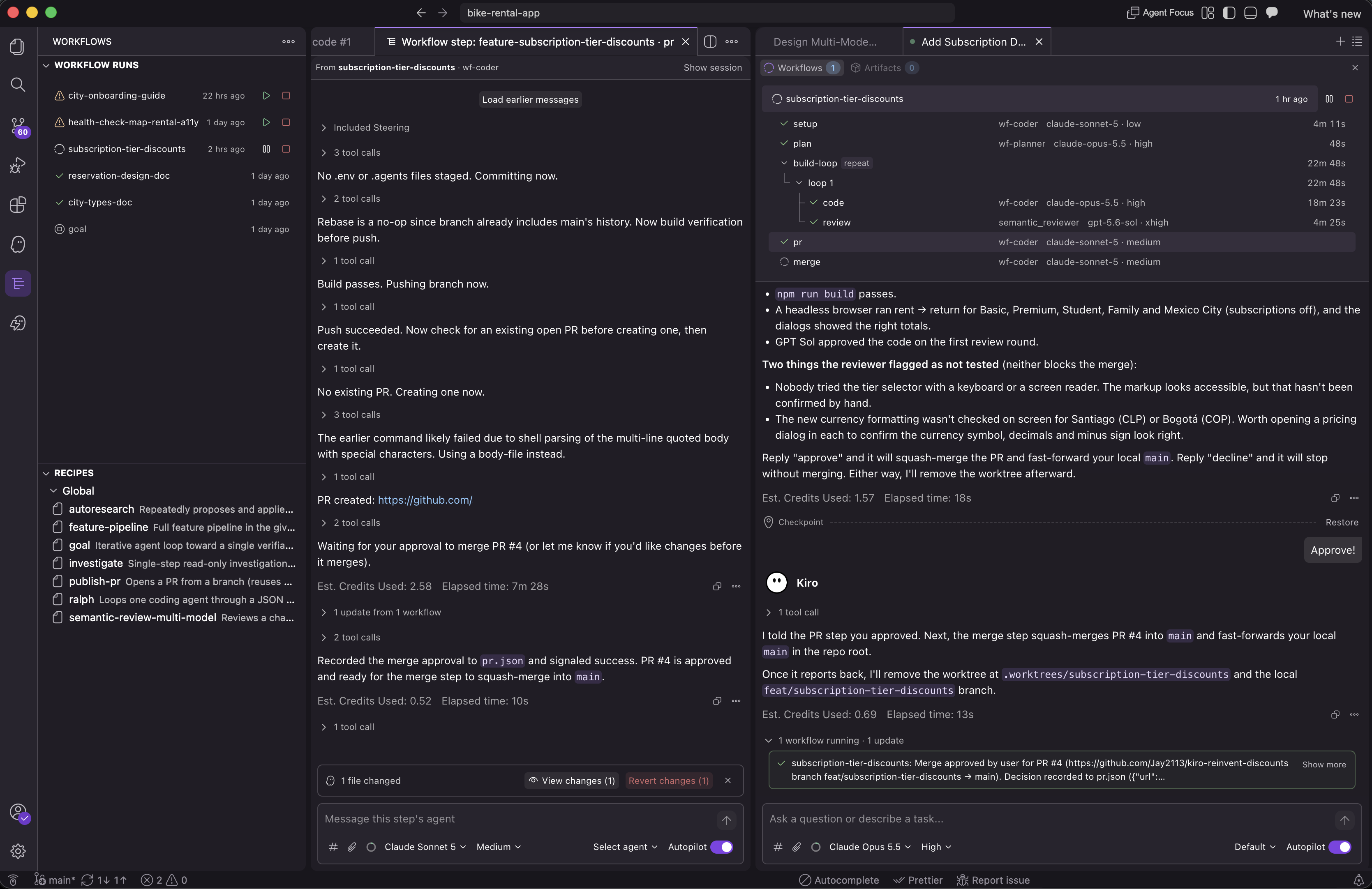
Workflow runs take place in the background while the main Kiro conversation remains available for other work. Step sessions can be paused, resumed or steered during a run, and revisited afterward.
Kiro states that delegating investigations can keep tool output and detailed reasoning out of the main conversation. Workflow steps also send messages to the main session when they report progress, complete or fail, or need a decision. Conversely, the main session can relay decisions to an agent working on a step. If the answer is already available in the conversation, Kiro can pass it along without requiring another intervention.
The company describes this as a way to make agent work more asynchronous, although workflows can still request input when a decision affects a design, expands scope or changes the user experience.
Graphs with loops and parallel branches
A workflow is made up of nodes that run in sequence unless they are placed inside a parallel branch. A repeat node can run a group of steps repeatedly until a condition is met, such as an approval recorded in a file.
Kiro’s example starts with a planning step, then enters a loop in which an agent implements the plan and commits the changes. Two independent reviewers assess the work in parallel. An aggregation step combines their findings and writes a verdict. The loop can run for up to three iterations before a draft pull request is opened.
Dependencies are defined by placing steps after the work they require and referring to earlier outputs through {{...}} variables. The format does not require separate graph edges for every dependency.
Kiro can also modify a workflow between steps based on what its agents discover. For example, a planner can divide an implementation into independent tasks and assign them to coding agents running in parallel. Completed work remains intact while the active step is unchanged.
A bundled feature pipeline
The bundled feature-pipeline recipe is a larger example. It coordinates requirements gathering, design, review, implementation planning and coding, with independent code reviewers running concurrently.
Its design and code loops each allow up to three attempts to reach approval. If the required approval is not reached, the run stops. A final validation step checks the result against the original requirements.
The example includes custom agents and model settings, including:
wf-designfor requirements and design workwf-design-reviewerfor design reviewwf-plannerfor implementation planningwf-coderfor implementation and validationsemantic_reviewerusing separate Claude and GPT model configurationswf-review-aggregatorfor combining review results
Thinking-effort settings can also be customized at the workflow or step level. Kiro notes that omitted settings use the defaults from the session that launched the workflow.
How Kiro says it uses Workflows
Kiro claims that much of the Workflows runtime and its Kiro Web integration were built using Workflows. Separate workflows handled frontend, API, internal-service and agent-harness work in parallel, with Git worktrees isolating implementation changes.
According to the company, agents opened pull requests, addressed review findings in loops, rebased branches and resolved merge conflicts as related changes landed. Kiro also mentions automated web UI testing through the agent-browser CLI, including screenshot capture for validation.
The company states that its agents often manage dozens of workflows in a session, with a typical workflow running five to 10 steps. It also claims that some sessions continue for weeks and that workflows run “nearly 24/7” across the team. Those figures describe Kiro’s internal usage rather than independently measured results.
Two built-in recipes highlighted by Kiro are:
investigate, which runs a read-only, single-agent investigation in the backgroundpublish-pr, which opens a pull request, retries failed CI checks and addresses review feedback it can safely resolve
The publish-pr recipe asks for input before changing a design, expanding a pull request’s scope or altering the user experience.
Availability and setup
Workflows are available in Kiro IDE, CLI and Web, all using the same runtime. The feature is launching as opt-in and must be enabled in workspace settings:
- Open Workspace Configuration for the project.
- Select Workflows.
- Enable Workflows.
- Start a new chat session. Kiro may need to be restarted for the setting to apply to existing sessions.
The corresponding setting is kiroAgent.workflows.enabled. If the Workflows option is not present, Kiro states that the feature is not yet available for that account.
Saved recipes can be stored through cloud configuration on Kiro Web and reused across projects and devices. Workflows also operate in cloud sessions launched from Kiro CLI and IDE. The workflows configuration page manages saved workflows and cloud-session settings.
Workflow runs use the same Kiro credit model as other agent work. Credit consumption depends on the amount of agent work performed, so more complex workflows may use more credits. Without detailed instructions, Kiro generates a workflow based on its interpretation of the task, while prompts and steering files influence how work is divided and how extensively it is reviewed.
Further details are available in the Workflows documentation.
Source: Kiro